Back to home
Boardly - AI Assisted Moodboard
An interactive canvas where ideas stay visual, flexible, and collaborative - with AI helping you organize, refine and provide clarity to your thinking and ideas.
Industry
AI, Creative industry
Role
Product Designer
Timeline
2 weeks
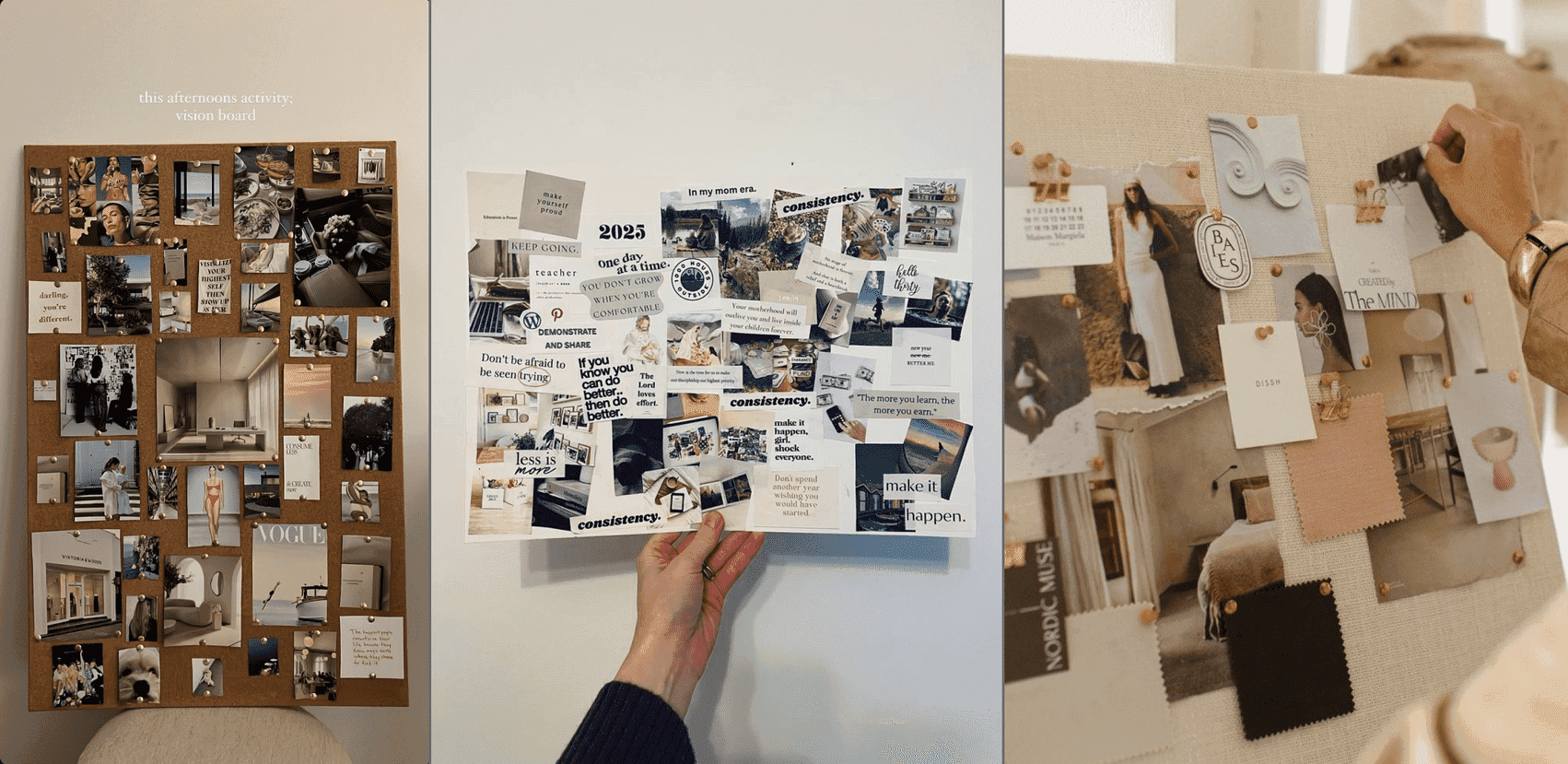
People naturally organize ideas visually, on walls, tables and notebooks; without rigid structure. Most digital moodboarding tools force grids, folders,or rigid layouts too early, breaking creative flow.
Boardly explores what a modern, AI-assisted moodboard could feel like if creativity came first.
Concept Overview
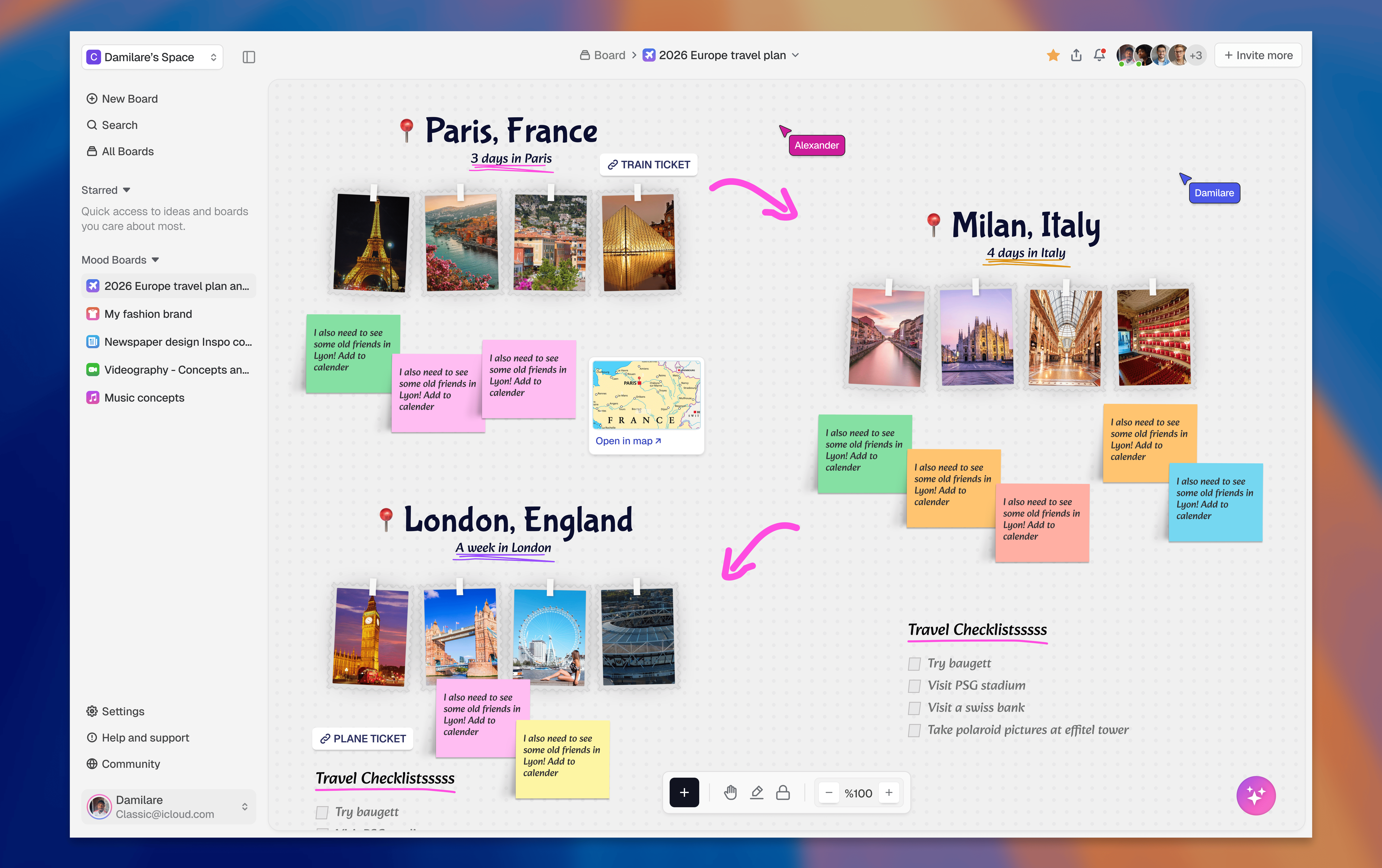
Boardly is a spatial moodboard where users can freely pin ideas, move elements and collaborate in real time. AI helps organize and evolve ideas without imposing structure.
Instead of forcing ideas into fixed layouts, Boardly is designed around how people naturally think, visually and freely. Users can place elements anywhere, move things around as ideas change and easily shift between brainstorming and organizing.
Core experience
The key interactions that define how users create, organize, collaborate and work alongside AI inside Boardly.
Add Elements {+}
Users can quickly add images, notes, sticky cards, checklists, and links directly onto the board without leaving the canvas.
Why:
Reduces friction and keeps users in creative flow without opening separate menus or pages.

Drag & Drop
Cards and elements can be freely moved around the board to create clusters, sections, or visual groupings.
Why:
It supports the way people naturally arrange ideas on physical moodboards, making the experience feel flexible and intuitive.

Card Hover Actions
When a user hovers over a card, a small action menu appears with options like edit, duplicate, lock, and delete.
Why:
This keeps the interface clean while still giving users quick access to important actions when they need them.

AI Chat Assistant
A floating AI panel allows users to give natural-language commands to organize, improve, and refine the board. Users can ask the AI to group ideas, create structure, suggest improvements, or generate planning elements without interrupting their creative flow.
Why:
The AI works as a supportive assistant, helping users structure ideas while keeping creative control in their hands.

Live Collaborator Cursors
Real-time cursors show where others are working on the board.
Why:
Creates awareness and makes collaboration feel active and human.

Invite Contributors
Users can invite others by email, assign access levels, and instantly see new contributors appear in the board’s member list.
Why:
It keeps collaboration simple and seamless, making it easy to bring others into the creative process.

Side Navigation & Shortcuts
The side navigation helps users switch between boards, and hovering reveals keyboard shortcuts for faster actions.
Why:
Supports power users while keeping the interface minimal for new users.

Design Decisions, Principles & Outcome
The product was shaped by a few core principles to keep the experience simple, flexible and focused on creative flow.
Creativity before structure - users can start messy and organize later as ideas become clearer.
Contextual UI - controls appear only when needed, keeping the board visually clean and focused.
AI as assistance, not control - AI helps users organize and improve ideas without taking decisions away from them.
Visual organization - the canvas allows users to arrange ideas freely, similar to how they would on a real moodboard.
Outcome
This concept explores how AI and visual interfaces can work together to support early-stage thinking. The prototype focuses on realistic interactions that make collaboration and idea organization feel natural and lightweight.
Previous Project
Coming soon
Next Project
Flora - AI Coding Assistant
Have a project, or looking to work together? Lets connect!
X
Linkenin
Resume
Back to home
Boardly - AI Assisted Moodboard
An interactive canvas where ideas stay visual, flexible, and collaborative - with AI helping you organize, refine and provide clarity to your thinking and ideas.
Industry
AI, Creative industry
Role
Product Designer
Timeline
2 weeks
People naturally organize ideas visually, on walls, tables and notebooks; without rigid structure. Most digital moodboarding tools force grids, folders,or rigid layouts too early, breaking creative flow.
Boardly explores what a modern, AI-assisted moodboard could feel like if creativity came first.
Concept Overview
Boardly is a spatial moodboard where users can freely pin ideas, move elements and collaborate in real time. AI helps organize and evolve ideas without imposing structure.
Instead of forcing ideas into fixed layouts, Boardly is designed around how people naturally think, visually and freely. Users can place elements anywhere, move things around as ideas change and easily shift between brainstorming and organizing.
Core experience
The key interactions that define how users create, organize, collaborate and work alongside AI inside Boardly.
Add Elements {+}
Users can quickly add images, notes, sticky cards, checklists, and links directly onto the board without leaving the canvas.
Why:
Reduces friction and keeps users in creative flow without opening separate menus or pages.
Drag & Drop
Cards and elements can be freely moved around the board to create clusters, sections, or visual groupings.
Why:
It supports the way people naturally arrange ideas on physical moodboards, making the experience feel flexible and intuitive.
Card Hover Actions
When a user hovers over a card, a small action menu appears with options like edit, duplicate, lock, and delete.
Why:
This keeps the interface clean while still giving users quick access to important actions when they need them.
AI Chat Assistant
A floating AI panel allows users to give natural-language commands to organize, improve, and refine the board. Users can ask the AI to group ideas, create structure, suggest improvements, or generate planning elements without interrupting their creative flow.
Why:
The AI works as a supportive assistant, helping users structure ideas while keeping creative control in their hands.
Live Collaborator Cursors
Real-time cursors show where others are working on the board.
Why:
Creates awareness and makes collaboration feel active and human.
Invite Contributors
Users can invite others by email, assign access levels, and instantly see new contributors appear in the board’s member list.
Why:
It keeps collaboration simple and seamless, making it easy to bring others into the creative process.
Side Navigation & Shortcuts
The side navigation helps users switch between boards, and hovering reveals keyboard shortcuts for faster actions.
Why:
Supports power users while keeping the interface minimal for new users.
Design Decisions, Principles & Outcome
The product was shaped by a few core principles to keep the experience simple, flexible and focused on creative flow.
Creativity before structure - users can start messy and organize later as ideas become clearer.
Contextual UI - controls appear only when needed, keeping the board visually clean and focused.
AI as assistance, not control - AI helps users organize and improve ideas without taking decisions away from them.
Visual organization - the canvas allows users to arrange ideas freely, similar to how they would on a real moodboard.
Outcome
This concept explores how AI and visual interfaces can work together to support early-stage thinking. The prototype focuses on realistic interactions that make collaboration and idea organization feel natural and lightweight.
Previous Project
Coming soon
Next Project
Flora - AI Coding Assistant
Have a project, or looking to work together? Lets connect!
X
Linkenin
Resume