Back to home
Neptune - Cloud Storage Dashboard
Neptune is a cloud storage web application designed to help users store, organize, and manage files seamlessly. The dashboard focuses on clarity, accessibility, and efficient file management through a clean, user-friendly interface.
Industry
Tech, Cloud Storage
Role
Product and Ui Designer
Timeline
Oct 2025 - dec 2025
The Problem
Users often struggle to quickly understand their storage usage and locate important files in cloud storage apps, especially when dashboards feel cluttered or overwhelming.
The Goal
The goal was to design a simple, well-structured dashboard that helps users quickly understand their storage usage, access frequently used files, and manage content with minimal friction.
Final Design
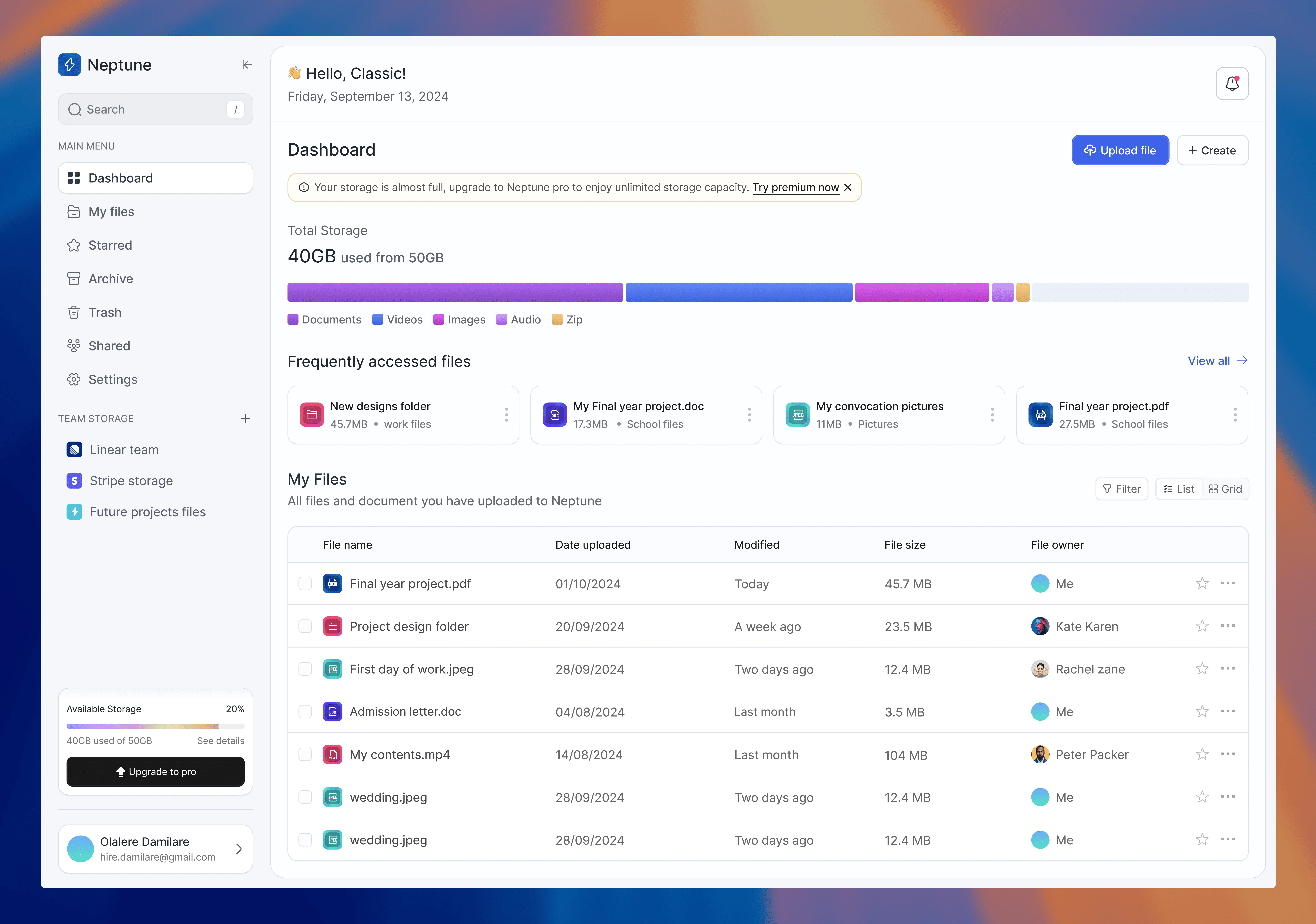
The final dashboard presents storage information at a glance, highlights frequently accessed files, and provides straightforward navigation for managing documents, media, and folders.
Key Design Decisions
Storage usage is placed prominently to give users immediate awareness of available space.
Frequently accessed files are surfaced to support faster workflows.
Color, spacing, and typography are used to clearly separate content types and actions.
Back to home
Neptune - Cloud Storage Dashboard
Neptune is a cloud storage web application designed to help users store, organize, and manage files seamlessly. The dashboard focuses on clarity, accessibility, and efficient file management through a clean, user-friendly interface.
Industry
Tech, Cloud Storage
Role
Product and Ui Designer
Timeline
Oct 2025 - dec 2025
The Problem
Users often struggle to quickly understand their storage usage and locate important files in cloud storage apps, especially when dashboards feel cluttered or overwhelming.
The Goal
The goal was to design a simple, well-structured dashboard that helps users quickly understand their storage usage, access frequently used files, and manage content with minimal friction.
Final Design
The final dashboard presents storage information at a glance, highlights frequently accessed files, and provides straightforward navigation for managing documents, media, and folders.
Key Design Decisions
Storage usage is placed prominently to give users immediate awareness of available space.
Frequently accessed files are surfaced to support faster workflows.
Color, spacing, and typography are used to clearly separate content types and actions.